 Peakub Support
Getting Started
Create an account and publish your first piece on Peakub
Welcome to Peakub, the home for quality publications and the all-in-one platforms for content creators. This guide will help you quickly start your journey on the platform.
Three things to do before anything else: create an account, set up a publication, and publish something. Everything past that is optional, at your own pace.
Browse the guides by category
Jump straight to what you need:
- Migration - moving over from Substack, beehiiv, WordPress, and more
- Publishing - posts, series, and publications
- Book Clubs - running a club and coverages
- Website & Pages - pages and branding on your site
- Custom Domains - connecting your own domain
- Podcasts - publishing episodes
- Growth & Audience - subscribers, discovery, and referrals
- Conversations - writing to some of your readers and answering their replies
- Monetization - tips, subscriptions, and getting paid
- Account & Billing - profile, subscription, and settings
- Security & Privacy - account security and data
- Community - comments, activity, and notifications
- For Readers - following, subscribing, and managing your reading
- Glossary - Peakub terms, defined
- Troubleshooting - common issues
Migrating your publication
Peakub has a built-in migration tool that migrates your Substack, Beehiv or Wordpress publication. Follow the migration guides.
Creating an account
Sign up with an email address (or a social login, where available),
then complete your profile. Your handle - the @name on your public
profile, and part of your URLs - is filled in from the name you enter
and checked as you go; if someone already has it, you'll be told so
you can pick another. It's worth choosing deliberately rather than
keeping whatever your name happens to produce.
Setting up your first publication
A publication is where your content lives (articles and newsletter issues) all under one name, description, and cover image. Set those three things first; everything else about a publication can change later without breaking anything. Your first creation will carry your profile handle unless you change it at creation. This helps you capitalize on followers you already have as a user.
Publications are addressed by a
unique identifier -
youridentifier.peakub.com, and the address of every post under it.
Unless it was already filled in for you, it follows the publication
name: Peakub turns what you typed into a URL-safe handle, checks that
nobody has taken it, and offers the next free variant if somebody has.
Edit the field yourself and it stops following the name - from then on
it stays exactly as you left it.
See Publishing once you're ready to write.
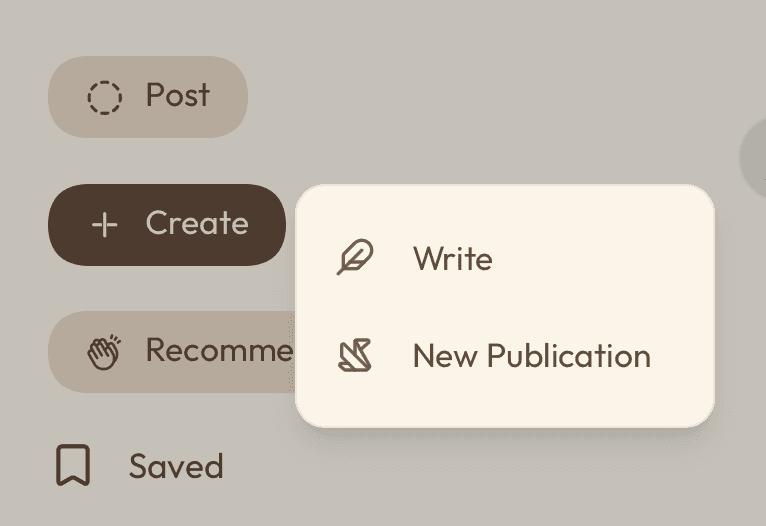 How to create a publication from the home page
Finding your way around
Four places you'll come back to: your feed (trending, what you follow, recommendations etc), your Studio (writing and managing content), and account settings (profile, billing, domains). Each gets its own section elsewhere in this guide. This page is just the map.
To make something, use the Create button in the left menu: Article, Page, Zine, Publication or Studio. In Studio the same button, at the bottom of the left menu, offers everything a publication can hold. See the Create menu.
Last updated on